- Blog/
The model is free. The inference isn't
Table of Contents
I’ve been using LLMs long enough to have opinions about prompting, to benchmark outputs, to argue about which model to pick for what task. And for a while, “free and open source” felt like the whole story. Download the model, run it, done.
Then I actually did it.
I installed Ollama, and pulled Gemma 4, Google’s latest open model released in April 2026, directly from my terminal. No API key. No cloud. Just a model running on my MacBook Pro M1.
ollama pull gemma4:26b
ollama run gemma4:26b
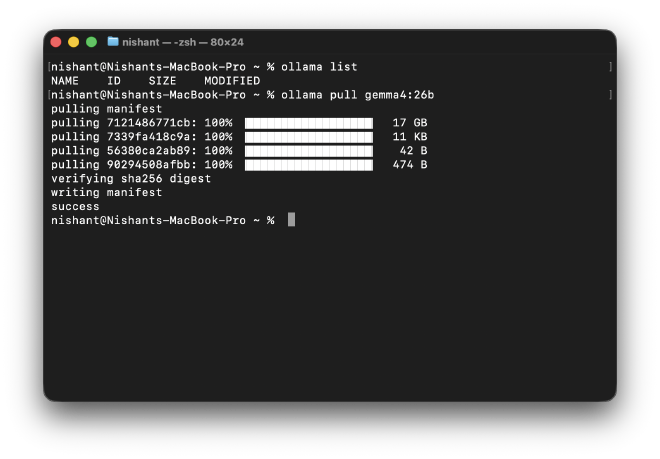
On Apple Silicon, Ollama automatically runs inference through Metal (the M1’s GPU framework) with zero configuration. The M1’s unified memory architecture means the CPU and GPU share the same memory pool, which is a big part of why modern MacBooks handle local models better than most people expect.
That was the crack in the black box. Everything else followed from there.
What the model actually looks like up close #
With a cloud API, the model is a name in a dropdown. Locally, you can inspect what you’re actually running. One command changed how I read model spec pages:
ollama show gemma4:26b
This is what came back:
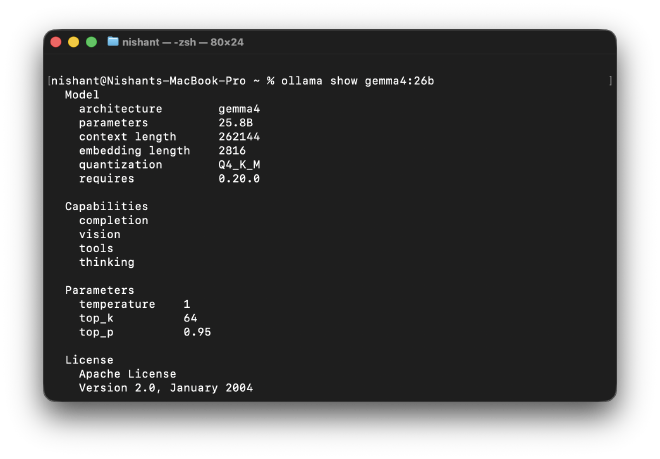
Model
  architecture        gemma4
  parameters          25.8B
  context length      262144
  embedding length    2816
  quantization        Q4_K_M

Capabilities
  completion
  vision
  tools
  thinking

Parameters
  temperature    1
  top_k          64
  top_p          0.95
A few things worth pausing on. The context length of 262144 is 256K tokens, enough to fit entire codebases or long documents in a single prompt. The capabilities list tells you what the model can actually do: not just text completion, but vision, tool use, and thinking. And the quantization label : Q4_K_M is the one that explains why a 25.8B parameter model downloaded as a 17GB file.
At full 16-bit precision, a 25.8B model would occupy over 50GB of memory. Quantization compresses the weights down to 4-bit, cutting that to 17GB. There’s a quality tradeoff, but it’s smaller than you’d expect and it’s what makes running a frontier-class model on a laptop viable at all.
The model you call through an API may also be quantized. You often can’t tell from the outside. That’s worth knowing when you’re comparing outputs or debugging unexpected behavior.
“26 billion parameters” doesn’t mean what you think it means #
The model I downloaded is called Gemma 4 26B. That number implies something heavier than what it is to run.
Gemma 4 26B is a Mixture of Experts model. Instead of one large network where every parameter fires on every input, it has 128 specialized sub-networks, experts, and routes each token through only 8 of them at a time. The result: roughly 3.8 billion active parameters per token, not 25.8 billion. Inference cost sits closer to a 4B model than a 26B one.
The catch that rarely gets mentioned: even though you only compute on 3.8B parameters at a time, all 25.8B have to be loaded and accessible in memory. Gemma 4 26B is cheaper to run than its name suggests, but not cheaper to fit. Compute cost and memory cost are different things — and conflating them is one of the most common mistakes in infrastructure planning for LLMs.
The full model name — gemma-4-26B-A4B — actually tells you this directly. The “A4B” stands for approximately 4 billion active parameters. The information is in the name. Most people don’t know to look for it.
This is why parameter count as a standalone benchmark claim is incomplete. Once you know to ask “active or total?”, you start finding that distinction absent almost everywhere it matters.
The model thinks out loud, if you let it #
I ran a simple prompt to see what the model would do:
ollama run gemma4:26b "Explain yourself in one sentence"
What appeared in the terminal wasn’t an immediate answer. It was this:
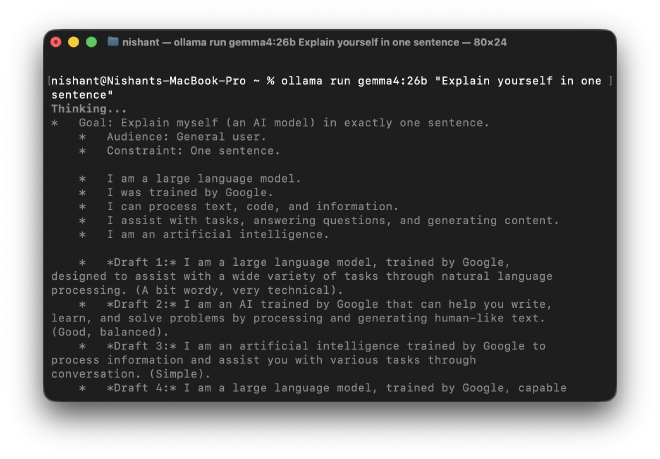
Thinking...
  Goal: Explain myself (an AI model) in exactly one sentence.
    Audience: General user.
    Constraint: One sentence.
  ...
  Draft 1: I am a large language model, trained by Google...
  Draft 2: I am an AI trained by Google that can help you write...
...done thinking.

I am a large language model, trained by Google, designed to assist
you with a wide range of tasks by processing and generating
human-like text.
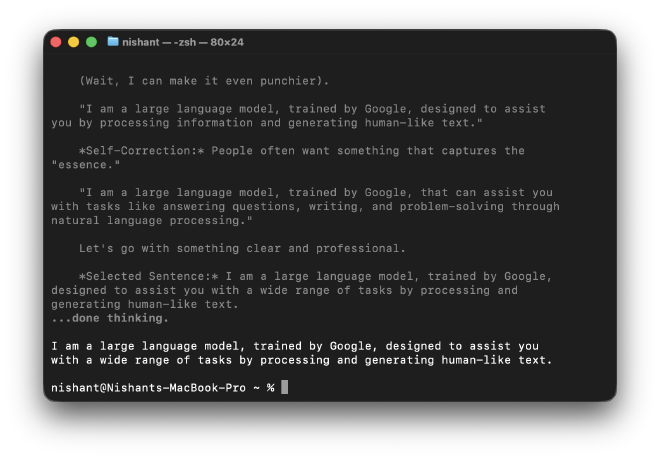
This is Gemma 4’s thinking mode — a reasoning capability where the model works through a problem step by step before producing an answer. The thinking tokens are internal scratchpad, not part of the final response. The model drafted multiple versions, evaluated them, and selected one.
I could feel the two phases of inference #
Running a model locally strips away the abstraction that cloud APIs add. You stop seeing a response and start seeing a process. And that process has two distinct phases that behave nothing like each other.
Before the model generates a single word of response, it reads your entire prompt in parallel. Every token at once. This is the prefill phase : fast, parallelizable, and relatively cheap. Then it switches modes. The response gets generated one token at a time, each one depending on all the tokens before it. This is the decode phase : sequential by nature, impossible to parallelize, and where almost all of your wait time lives.
On a cloud API these two phases collapse into one experience: you send a message, you wait, you get an answer. Locally, they’re separable. And Ollama lets you measure them directly.
Start an interactive session and type /set verbose before sending a prompt:
bash
ollama run gemma4:26b
>>> /set verbose
Set 'verbose' mode.
>>> Explain what a transformer architecture is in two paragraphs
After the response, you’ll see something like this printed to your terminal:
prompt eval count:    12 tokens
prompt eval duration: 0.11s
prompt eval rate:     109.1 tokens/s    ← prefill speed

eval count:           247 tokens
eval duration:        18.2s
eval rate:            13.6 tokens/s    ← decode speed
The gap between those two rates is the entire story. Prefill processes tokens in parallel so it’s fast regardless of prompt length. Decode is sequential, the rate you see there is roughly your ceiling for how fast this model can generate text on this machine, no matter how short your prompt is.
Try it with two different prompts back to back. One that asks for a one-word answer. One that asks for a detailed explanation. Watch what changes: the prefill rate stays roughly the same (you’re reading a similar-length prompt both times). The decode rate stays roughly the same too. But the second response takes dramatically longer because you’re paying the decode cost per output token, and you asked for more of them.
This is why “why is it slow?” is usually the wrong question. The right questions are: how long is the output, and how many tokens per second can this hardware sustain during decode?
What’s sitting in memory the whole time #
While the model is running, open a second terminal window and run:
bash
ollama ps
You’ll see something like:
NAME           SIZE    PROCESSOR    UNTIL
gemma4:26b     17 GB   100% GPU     4 minutes from now
Two things worth noting here.
The 100% GPU confirms that Ollama is using Metal (the M1’s GPU framework) automatically. No configuration, no flags. The unified memory architecture on Apple Silicon means the CPU and GPU share the same physical memory pool, which is why a 17GB model fits and runs at all on a MacBook. On a machine with a discrete GPU, that 17GB would need to fit in dedicated VRAM, a much harder constraint.
The 17GB figure is the quantized model weights sitting in memory. They stay there as long as the session is active. But as your conversation grows, something else starts growing alongside it: the KV cache.
During decode, the model needs to attend to every previous token to generate the next one. Recomputing that attention from scratch on every new token would be brutally slow, so instead it caches the intermediate computation, the key and value matrices, for every token it has already seen. That cache lives in memory, and it grows with every exchange.
For Gemma 4 26B with a 262,144-token context window, a full-context conversation could accumulate several additional gigabytes of KV cache on top of the model weights. You’re not just paying for the model, you’re paying for the memory of the conversation.
This is why long-context inference is expensive in ways that per-token pricing doesn’t fully capture. A short query on a fresh session and the same query after a 100,000-token conversation have very different memory footprints, even if the output is identical.
One laptop, one user and that’s already the limit #
Everything above assumes something important: one person sending one request at a time.
Running a model for yourself on a laptop is a fun experiment. Trying to serve multiple users simultaneously introduces a whole new level of complexity. If you process requests sequentially, User #100 is going to give up long before their request reaches the front of the queue. The memory you’ve allocated to User #1’s KV cache is memory User #2 can’t use. And the decode bottleneck that felt manageable at 1x becomes the ceiling that breaks everything at 10x.
How production inference systems solve this — batching, continuous batching, KV cache eviction, inference servers — is a topic for the next piece.